
The event sends no triggers to commands. Unless control is disabled separately, it can still update the item.
DeviceJockey
Manual
Remote Options
Remote Options determine which commands an event executes within an item.
Controlled connections
Link events to commands intentionally.
An event can control the item and pass a trigger to its commands. Remote Options define which of those commands may execute. By default, an event sends all triggers while a command accepts direct item interaction only.
Triggers work only within the same item. An event can therefore execute commands assigned to that item, but it does not directly trigger commands belonging to another item.
Some events only update a specific item property and do not offer Remote Options. The available choices therefore depend on the selected event and command.
Avoid feedback loops.
An event can execute a command that causes the same event to return. Check these relationships carefully before using them in a live workflow.
Watch the basics
Connect events and commands with Remote Options.
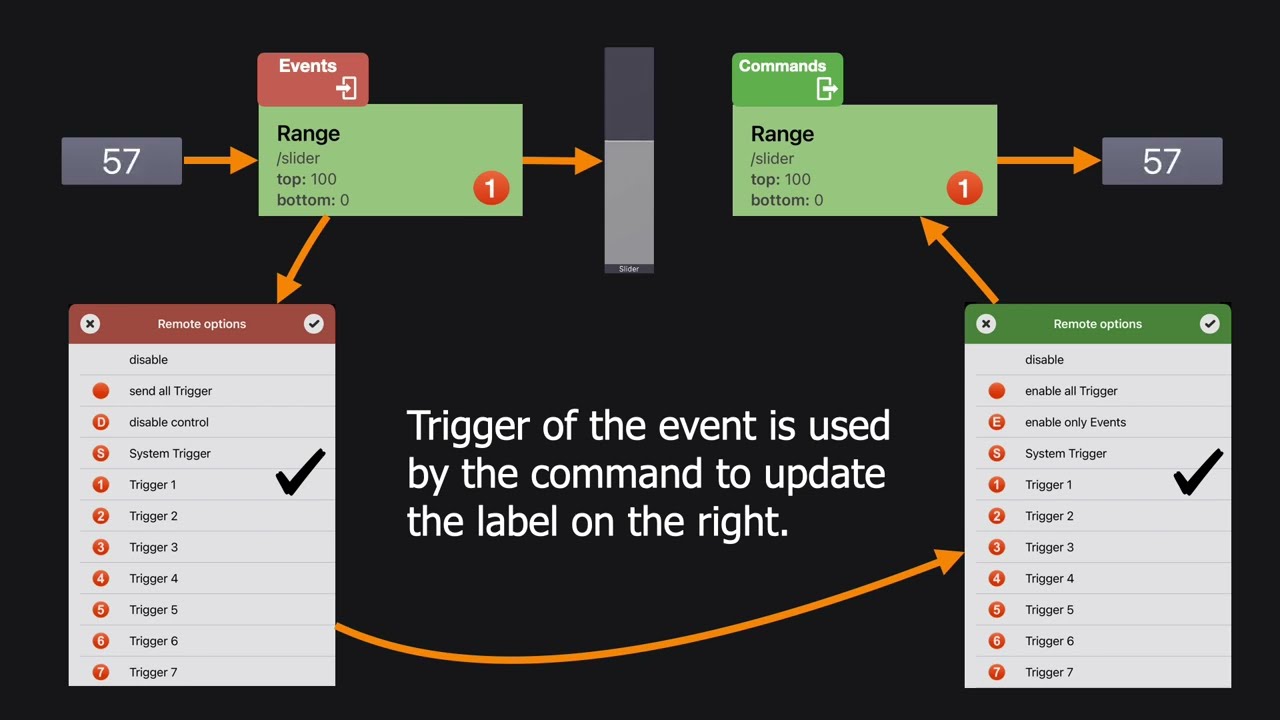
Triggers
Choose which commands react to an event.
Where Remote Options are available, you can use twenty numbered triggers. Select one or more trigger numbers in an event. Commands with at least one matching trigger number are executed when the event occurs.
1
← Event occurs
The item receives information from an interface or system event.
2
Event sends triggers
Its Remote Options provide the selected trigger numbers.
3
Commands match
Commands on the same item check their selected trigger numbers.
4
Commands execute →
Every command with a matching trigger is executed.
← Event options
Control what the event does.
The event sends all twenty triggers so every command configured for a numbered trigger can respond.
The event no longer changes the item state. It can still execute commands through its triggers.
The event sends the special System Event trigger.
The event sends one or more selected trigger numbers.
Command options →
Control when the command executes.
The command is not triggered by events. It can still run through direct item interaction.
The command no longer runs through a direct change to the item. Only an event can trigger it.
The command responds to every numbered trigger sent by an event.
The command responds when an event sends the special System Event trigger.
The command responds to one or more selected trigger numbers.
Commands with animations have additional options.
Animation start, Animation end and Animation cancelled can be used as matching conditions where the command supports an animated state change.
Example
Let an incoming event execute a command.
Select a trigger in the event.
For example, configure the event to send Trigger 1.
Select the same trigger in a command.
Configure one or more commands on the same item to respond to Trigger 1.
Receive the event.
The Event reacts, updates the Item if configured, and executes the Commands that use the same trigger.
Test the complete path.
Confirm that the resulting commands do not cause an unwanted event loop.